

A pattern trigger takes a value from what you type. For example, ;order 4821 can become an order-status sentence containing 4821. Patterns are useful when a fixed abbreviation would still leave you retyping an identifier.
Define a pattern
Create a snippet called Order reference. Set Trigger to Pattern and enter:
;order {id:digits}Choose Space or Enter as the completion key. Use a distinctive punctuation prefix, such as the semicolon here, so ordinary prose does not accidentally start the pattern.
The supported capture types are:
| Capture | Matches | Example |
|---|---|---|
| word | A word | ;hello {name:word} |
| digits | Digits | ;order {id:digits} |
| text | Text ending at a following literal | ;quote {text:text}! |
Separate captures with literal text. A text capture ends at its first following literal delimiter; in the quote example, that is the exclamation mark. Pattern syntax is not regular-expression syntax.
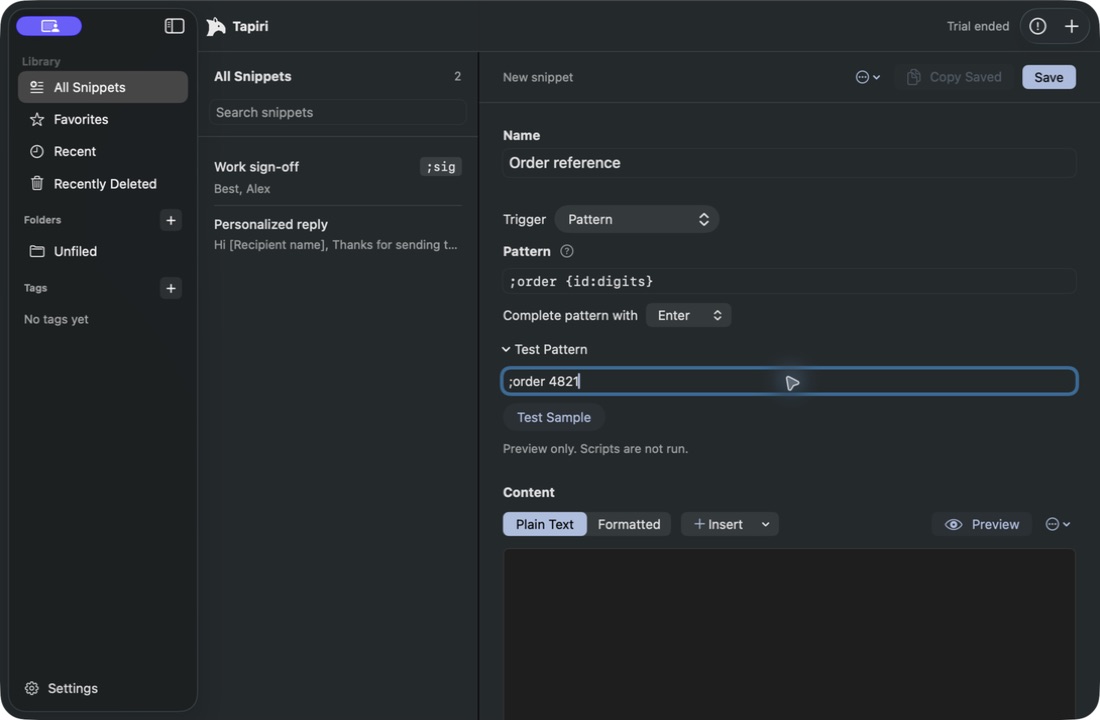
Set the pattern and completion key, then enter a sample without that completion key.
Put the captured value in the result
Enter a Text block containing Your order number is . Choose Insert → Pattern Capture → id, then add a Text block containing a full stop.
Move the blocks into the intended order. Save after checking both the pattern and content. A pattern capture comes from the typed input; it is different from a fill-in field that asks a question afterward.
Test the match before typing elsewhere
Testing and previewing require an active trial or license. Expand Test Pattern. In Sample input, enter ;order 4821 without the final completion key, then choose Test Sample. Inspect the reported match and captured value.
Try an invalid example such as ;order abc too. The test checks pattern matching; it does not execute scripts.
Then test the saved snippet in a blank TextEdit document with an active trial or license, working Accessibility access, and expansion enabled. Type the sample and press the configured completion key. Inspect the resulting text.
Understand completion and limits
After a recognized prefix, Tapiri can consume the completion key even when the remainder does not form a valid match. Do not depend on Enter completion as a universal safeguard against sending messages in another app.
Patterns support up to 256 characters, eight captures, and 512 input units, with up to 64 enabled patterns. Read validation feedback when editing. Keep patterns short and distinct; if several snippets overlap, resolve the ambiguity before relying on them.
App rules and pause controls also matter when testing patterns. A correct pattern cannot expand in an excluded app or while automatic expansion is paused.